将眼底照片特定于患者的映射到三维眼成像 - 第1部分:光线追迹#
此示例包含对论文的射线疗法模拟[将眼底照片特定于三维的眼部成像](https://doi.org/10.1002/mp.17576)。
引用#
在引用ZOSPy以外,还请在使用此示例或此示例中提供的数据时引用以下论文:
Haasjes, C., Vu, T. H. K., & Beenakker, J.-W. M. (2024). Patient-specific mapping of fundus photographs to three-dimensional ocular imaging. Medical Physics. https://doi.org/10.1002/mp.17576
保修和责任#
提供的代码和数据仅用于研究目的。没有保证,也不能从中获得权利,正如该存储库的一般许可中所述。
导入依赖项#
[1]:
import json

import matplotlib.pyplot as plt
import numpy as np
import pandas as pd
import seaborn as sns
from helpers import InputOutputAngles, get_nodal_points, get_retina_locations

import zospy as zp
[2]:
import warnings

warnings.filterwarnings("ignore", message="Header and row length mismatch")
初始化OpticStudio#
通过ZOSPy与OpticStudio建立连接。
在此示例中,我们在“扩展”模式下与OpticStudio连接。对于更广泛的模拟,我们建议使用“独立”来大大提高计算性能。
[3]:
zos = zp.ZOS()
[4]:
oss = zos.connect("extension")
定义眼睛模型#
使用的眼模模型基于健康受试者的临床测量。
[5]:
# navarro_geometry = {
#     "axial_length": 23.9203,  # mm
#     "cornea_thickness": 0.5,  # mm
#     "anterior_chamber_depth": 3.05,  # mm
#     "lens_thickness": 4.0,  # mm
#     "cornea_front_curvature": 7.72,  # mm
#     "cornea_front_asphericity": -0.26,
#     "cornea_back_curvature": 6.5,  # mm
#     "cornea_back_asphericity": 0,
#     "iris_radius": 0.5,  # mm
#     "lens_front_curvature": 10.2,  # mm
#     "lens_front_asphericity": -3.1316,
#     "lens_back_curvature": -6.0,  # mm
#     "lens_back_asphericity": -1,
#     "retina_curvature": -12.0,  # mm
#     "retina_asphericity": 0.0,
# }

geometry = {
    "axial_length": 24.305,  # mm
    "cornea_thickness": 0.5615,  # mm
    "anterior_chamber_depth": 3.345,  # mm
    "lens_thickness": 3.17,  # mm
    "cornea_front_curvature": 7.6967,  # mm
    "cornea_front_asphericity": -0.2304,
    "cornea_back_curvature": 6.2343,  # mm
    "cornea_back_asphericity": -0.1444,
    "iris_radius": 0.5,  # mm
    "lens_front_curvature": 10.2,  # mm
    "lens_front_asphericity": -3.1316,
    "lens_back_curvature": -5.4537,  # mm
    "lens_back_asphericity": -4.1655,
    "retina_curvature": -11.3357,  # mm
    "retina_asphericity": -0.0631,
}

geometry["vitreous_thickness"] = geometry["axial_length"] - (
    geometry["cornea_thickness"] + geometry["anterior_chamber_depth"] + geometry["lens_thickness"]
)
geometry["retina_radius_z"] = abs(geometry["retina_curvature"] / (geometry["retina_asphericity"] + 1))
geometry["retina_radius_y"] = abs(geometry["retina_curvature"] / np.sqrt(geometry["retina_asphericity"] + 1))

# For the Lamberth projection, a spherical retina needs to be used
# mean_retina_radius = np.mean([geometry["retina_radius_z"], geometry["retina_radius_y"]])
# geometry["retina_curvature"] = geometry["retina_radius_y"] = geometry[
#     "retina_radius_z"
# ] = -mean_retina_radius
# geometry["retina_asphericity"] = 0.0

refractive_indices = {  # at 543 nm (green light)
    "cornea": 1.3777,
    "aqueous": 1.3391,
    "lens": 1.4222,
    "vitreous": 1.3377,
}

with open("data/geometry.json", "w") as f:
    json.dump(geometry, f)
在Opticstudio中初始化光学系统#
对于光线追迹,使用了543 nm的波长(在可见光谱的中心), 输入的视场角度从0°到85°,步距为5°。
光线瞄准(OpticStudio的特征,它移动外围输入光束,使其穿过实际瞳孔的中心)被关闭,就像在眼科成像中,入瞳在图像的中心。
[6]:
APERTURE = zp.constants.SystemData.ZemaxApertureType.FloatByStopSize
WAVELENGTH = 0.543  # nm
FIELDS = np.arange(0, 90, 5)  # degrees with respect to the optical axis
[7]:
oss.new()
oss.make_sequential()

oss.SystemData.Aperture.ApertureType = zp.constants.SystemData.ZemaxApertureType.FloatByStopSize
oss.SystemData.Wavelengths.GetWavelength(1).Wavelength = WAVELENGTH
oss.SystemData.RayAiming.RayAiming = zp.constants.SystemData.RayAimingMethod.Off

# Add fields
for i, f in enumerate(np.array(FIELDS).astype(float)):
    if i == 0:
        oss.SystemData.Fields.GetField(1).X = 0
        oss.SystemData.Fields.GetField(1).Y = f
        oss.SystemData.Fields.GetField(1).Weight = 1
    else:
        oss.SystemData.Fields.AddField(X=0, Y=f, Weight=1)
创建眼睛模型#
对于每个表面,设置了曲率、非球面度、厚度和折射率。
[8]:
# Dummy surface, needed for calculation of input angles
input_beam = oss.LDE.InsertNewSurfaceAt(1)
input_beam.Comment = "Input beam"
input_beam.Thickness = 1.0
input_beam.DrawData.DoNotDrawThisSurface = True

cornea_front = oss.LDE.InsertNewSurfaceAt(2)
cornea_front.Comment = "Cornea Front"
cornea_front.Thickness = geometry["cornea_thickness"]
cornea_front.Radius = geometry["cornea_front_curvature"]
cornea_front.Conic = geometry["cornea_front_asphericity"]
zp.solvers.material_model(cornea_front.MaterialCell, refractive_index=refractive_indices["cornea"])

cornea_back = oss.LDE.InsertNewSurfaceAt(3)
cornea_back.Comment = "Cornea Back / Aqueous"
cornea_back.Thickness = geometry["anterior_chamber_depth"]
cornea_back.Radius = geometry["cornea_back_curvature"]
cornea_back.Conic = geometry["cornea_back_asphericity"]
zp.solvers.material_model(cornea_back.MaterialCell, refractive_index=refractive_indices["aqueous"])
cornea_back.DrawData.DoNotDrawEdgesFromThisSurface = True

pupil = oss.LDE.GetSurfaceAt(4)
assert pupil.IsStop, "Pupil must be the STOP surface."
pupil.Comment = "Pupil"
pupil.SemiDiameter = geometry["iris_radius"]
zp.solvers.material_model(pupil.MaterialCell, refractive_index=refractive_indices["aqueous"])
pupil.DrawData.DoNotDrawEdgesFromThisSurface = True

lens_front = oss.LDE.InsertNewSurfaceAt(5)
lens_front.Comment = "Lens Front"
lens_front.Thickness = geometry["lens_thickness"]
lens_front.Radius = geometry["lens_front_curvature"]
lens_front.Conic = geometry["lens_front_asphericity"]
lens_front.SemiDiameter = 4.0  # Larger diameter for visualization purposes
zp.solvers.material_model(lens_front.MaterialCell, refractive_index=refractive_indices["lens"])

lens_back = oss.LDE.InsertNewSurfaceAt(6)
lens_back.Comment = "Lens Back / Vitreous"
lens_back.Thickness = geometry["vitreous_thickness"]
lens_back.Radius = geometry["lens_back_curvature"]
lens_back.Conic = geometry["lens_back_asphericity"]
zp.solvers.material_model(lens_back.MaterialCell, refractive_index=refractive_indices["vitreous"])
lens_back.DrawData.DoNotDrawEdgesFromThisSurface = True

retina = oss.LDE.GetSurfaceAt(7)
assert retina.IsImage, "Retina must be the IMAGE surface."
retina.Comment = "Retina"
retina.Radius = geometry["retina_curvature"]
retina.Conic = geometry["retina_asphericity"]
retina.Thickness = 0
# Set the refractive index of the retina to the vitreous to prevent reflections
zp.solvers.material_model(retina.MaterialCell, refractive_index=refractive_indices["vitreous"])

# Modify the settings for the visualization of the system
for i in range(1, oss.LDE.NumberOfSurfaces + 1):
    oss.LDE.GetSurfaceAt(i).DrawData.DrawEdgesAs = zp.constants.Editors.LDE.SurfaceEdgeDraw.Flat
在Opticstudio中显示眼模
[9]:
_ = zp.analyses.systemviewers.Viewer3D().run(oss)

执行光线追迹#
光线是从光源(相机)到视网膜的,对于在OptiCstudio中配置的不同视场。
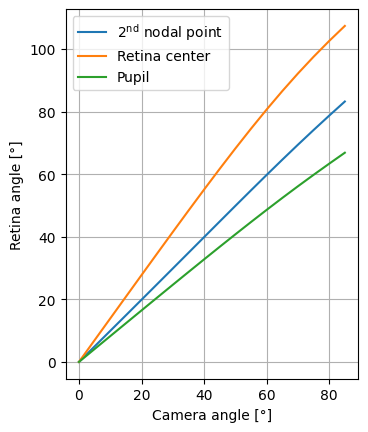
结果是根据相机角度和视网膜角度进行评估。后三个参考点比较:第二节点,视网膜中心和瞳孔。
[10]:
ray_trace_results = {}
input_output_angles = []

# Nodal points are calculated in OpticStudio, but can also be calculated analytically
np1, np2 = get_nodal_points(oss)

for i in range(1, oss.SystemData.Fields.NumberOfFields + 1):
    y_angle = oss.SystemData.Fields.GetField(i).Y
    ray_trace_results[y_angle] = zp.analyses.raysandspots.SingleRayTrace(
        px=0, py=0, field=i, global_coordinates=True
    ).run(oss)
    ray_trace_results[y_angle].data.real_ray_trace_data["InputAngle"] = y_angle

    input_output_angles.append(
        InputOutputAngles.from_ray_trace_result(
            ray_trace_results[y_angle],
            y_angle,
            np2=np2,
            np2_navarro=np2,
            retina_center=(
                geometry["lens_thickness"]
                + geometry["vitreous_thickness"]
                - (abs(geometry["retina_curvature"] / (geometry["retina_asphericity"] + 1)))
            ),
            patient="Patient1",
        )
    )

real_ray_trace_results = pd.concat(r.data.real_ray_trace_data for r in ray_trace_results.values())
input_output_angles = pd.DataFrame(input_output_angles)
将视网膜位置添加到数据帧
[11]:
input_output_angles["retina_location"] = input_output_angles.apply(
    lambda r: get_retina_locations(r, real_ray_trace_results), axis=1
)

input_output_angles
[11]:
| input_angle_field | input_angle_cornea | input_angle_pupil | output_angle_pupil | output_angle_np2 | output_angle_retina_center | output_angle_navarro_np2 | location_np2 | location_retina_center | patient | retina_location | |
|---|---|---|---|---|---|---|---|---|---|---|---|
| 0 | 0.0 | 0.0 | 0.000000 | 0.000000 | 0.000000 | 0.000000 | 0.000000 | 3.457872 | 8.299343 | Patient1 | (20.3985, 0.0) |
| 1 | 10.0 | 10.0 | 8.559338 | 8.236620 | 9.924741 | 13.887107 | 9.924741 | 3.457872 | 8.299343 | Patient1 | (20.022129705, 2.8982969683) |
| 2 | 20.0 | 20.0 | 17.125957 | 16.461583 | 19.876188 | 27.752562 | 19.876188 | 3.457872 | 8.299343 | Patient1 | (18.929358005, 5.5933282836) |
| 3 | 30.0 | 30.0 | 25.710515 | 24.653892 | 29.866615 | 41.532014 | 29.866615 | 3.457872 | 8.299343 | Patient1 | (17.225415858, 7.9060177623) |
| 4 | 40.0 | 40.0 | 34.330320 | 32.778578 | 39.883907 | 55.092636 | 39.883907 | 3.457872 | 8.299343 | Patient1 | (15.071429925, 9.7049004243) |
| 5 | 50.0 | 50.0 | 43.012066 | 40.784670 | 49.883060 | 68.229900 | 49.883060 | 3.457872 | 8.299343 | Patient1 | (12.661808084, 10.923468966) |
| 6 | 60.0 | 60.0 | 51.792984 | 48.602608 | 59.775819 | 80.686513 | 59.775819 | 3.457872 | 8.299343 | Patient1 | (10.196207912, 11.566389056) |
| 7 | 70.0 | 70.0 | 60.718906 | 56.149161 | 69.430824 | 92.200759 | 69.430824 | 3.457872 | 8.299343 | Patient1 | (7.8495996064, 11.703115207) |
| 8 | 80.0 | 80.0 | 69.838344 | 63.373162 | 78.731841 | 102.612037 | 78.731841 | 3.457872 | 8.299343 | Patient1 | (5.7383659648, 11.445857555) |
| 9 | 5.0 | 5.0 | 4.279254 | 4.118911 | 4.960514 | 6.944355 | 4.960514 | 3.457872 | 8.299343 | Patient1 | (20.303833183, 1.4621330149) |
| 10 | 15.0 | 15.0 | 12.841190 | 12.351573 | 14.895882 | 20.825151 | 14.895882 | 3.457872 | 8.299343 | Patient1 | (19.560230904, 4.2832673229) |
| 11 | 25.0 | 25.0 | 21.415104 | 20.563653 | 24.866623 | 34.659589 | 24.866623 | 3.457872 | 8.299343 | Patient1 | (18.144798235, 6.8070476922) |
| 12 | 35.0 | 35.0 | 30.014588 | 28.727470 | 34.873829 | 48.350894 | 34.873829 | 3.457872 | 8.299343 | Patient1 | (16.192992149, 8.8754977161) |
| 13 | 45.0 | 45.0 | 38.661366 | 36.800334 | 44.890134 | 61.729413 | 44.890134 | 3.457872 | 8.299343 | Patient1 | (13.885875539, 10.388088262) |
| 14 | 55.0 | 55.0 | 47.387416 | 44.722252 | 54.850162 | 74.560403 | 54.850162 | 3.457872 | 8.299343 | Patient1 | (11.424123782, 11.313897756) |
| 15 | 65.0 | 65.0 | 56.234756 | 52.414799 | 64.642057 | 86.575621 | 64.642057 | 3.457872 | 8.299343 | Patient1 | (8.9989454527, 11.691614612) |
| 16 | 75.0 | 75.0 | 65.251528 | 59.800635 | 74.128488 | 97.546003 | 74.128488 | 3.457872 | 8.299343 | Patient1 | (6.7605642505, 11.616108718) |
| 17 | 85.0 | 85.0 | 74.484459 | 66.881087 | 83.250187 | 107.415926 | 83.250187 | 3.457872 | 8.299343 | Patient1 | (4.7841584997, 11.206051257) |
保存输出
[12]:
real_ray_trace_results.to_csv("data/ray_trace_results.csv", index=False)
input_output_angles.to_csv("data/input_output_angles.csv", index=False)
绘制输入角度(相机角)和输出角(视网膜角)之间的关系
[13]:
fig, ax = plt.subplots()

sns.lineplot(
    data=input_output_angles,
    x="input_angle_field",
    y="output_angle_np2",
    label="$2^{\\mathrm{nd}}$ nodal point",
)
sns.lineplot(
    data=input_output_angles,
    x="input_angle_field",
    y="output_angle_retina_center",
    label="Retina center",
)
sns.lineplot(
    data=input_output_angles,
    x="input_angle_field",
    y="output_angle_pupil",
    label="Pupil",
)

ax.set_xlabel("Camera angle [°]")
ax.set_ylabel("Retina angle [°]")
ax.set_aspect("equal")
ax.grid()